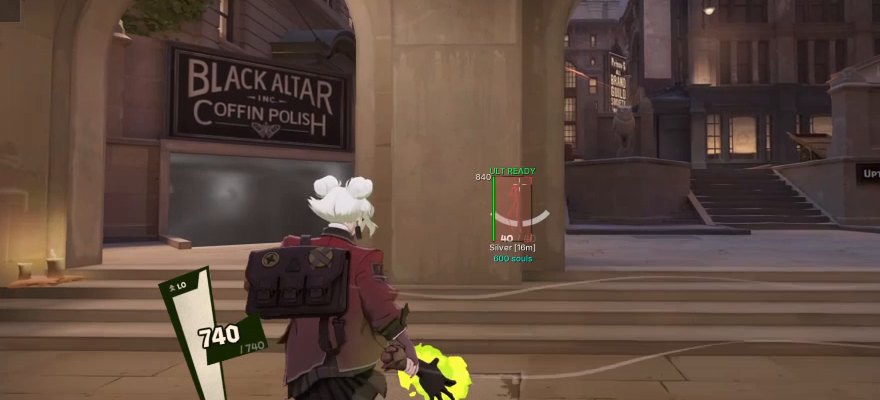
Deadlock ESP and Wallhack: What It Shows and How to Get It
Ever been picked off by someone who always seemed to know where you were? They pre-aimed the corner you were about to walk around, rotated the moment you went for the Urn, and never walked into your ambush.
Some players just have great game sense. Others are using ESP.
ESP, often called a wallhack, draws the information the game normally hides straight onto your screen: where every enemy is, how much health they have, and which abilities they have ready, even through walls.
TSUKI shows you all of that and more. Our player, world and ability ESP covers every enemy, objective and spawn timer on the map. Here's what it shows and how you can get it.
What Is ESP in Deadlock?
ESP stands for extra sensory perception. In practice, it draws boxes, names and health bars over other players, whether or not you can actually see them. A wallhack is the same idea: when people say wallhack, they mean seeing enemies through walls, which is exactly what ESP does.
In Deadlock, good ESP goes a lot further than player boxes. Ability cooldowns, ultimates, souls, objectives and spawn timers can all be on your screen, so every fight and every rotation starts with more information than your opponent has.
Player ESP
Boxes, skeletons, health, distance, souls, ultimates and every ability cooldown for each enemy.
World ESP
Soul orbs, dropped souls, the Urn, Sinner's Sacrifice, bridge buffs, the Midboss and enemy footsteps.
Visibility Check
One color when an enemy is visible, another when they're behind a wall, on every ESP feature.
What Does Player ESP Show?
TSUKI's player ESP gives you a full read on every enemy at a glance:
- Boxes and skeletons in 2D or corner style, with per-bone visibility coloring and separate enemy and friendly colors.
- Health bars, names and distance, plus each player's unsecured souls and level.
- Ultimate ESP that warns you when an enemy's ultimate is ready and shows its cooldown.
- Ability ESP that tracks every ability slot for each enemy hero, with per-ability cooldowns.
- 40+ status indicators, so you can see when someone is stunned, slept, invisible or using Metal Skin.
- Stealth ESP that shows you who is invisible.
- Spectator ESP, so you know instantly when someone is watching you.
- Off-screen indicators for enemies outside your view, plus net worth and K/D thresholds that only highlight the players worth worrying about.
It even shows who has Healing Rite applied and which ultimate Sinclair has copied, each with a timer.
What About the Rest of the Map?
Players are only half of it. World ESP puts the map's souls and objectives on your screen too:
- Soul orbs with a timer that shows when they're hittable or about to disappear, and dropped souls you can filter by value and distance.
- The Soul Urn, Sinner's Sacrifice and the Midboss, including the Midboss's health.
- Bridge buffs, with a warning and a sound alert before they spawn.
- Towers, troopers and monster camps in separate friendly and enemy colors.
- Sound ESP, which draws enemy footsteps in the world when you hear them.
- Guided Owl and breakables ESP.
Timers for monster camps, the Rift, the Urn and bridge buffs can draw in the world, on the minimap, or both. Alerts fire before each spawn, so you can rotate in time instead of reacting late.
Can You Tell Who's Behind a Wall?
Yes. TSUKI runs a full raycast visibility check, so every ESP feature can use one color when an enemy is in your line of sight and another when they're behind cover. You choose the visible and hidden colors separately for every feature.
The same visibility check works with the aimbot, so it only engages when it has line of sight, and it treats walkers, guardians and towers as cover.
See TSUKI ESP in Action
Watch an enemy's box, health, distance, souls and ultimate status follow them as they move behind cover, with the color changing the moment they leave your line of sight.
ESP vs Radar
ESP draws information on your game screen. TSUKI's 2D radar shows enemy and teammate positions on a minimap overlay with hero icons and aim lines, along with sinners, towers and other objectives.
There's also a Web Radar: start a local radar server and view it on a second device, or share it with a friend. You can try the Web Radar demo right in your browser.
How to Get ESP in Deadlock
The TSUKI Deadlock cheat includes player, world and ability ESP, the raycast visibility check, timers and the radar, in both External and Internal mode.
Want glow and chams too? Player and NPC glow and chams are part of the optional internal component, which comes included with the standard subscription.
ESP is included with every TSUKI subscription, alongside aimbot, auto parry, Lua scripting and every other feature.
Frequently Asked Questions
What's the difference between ESP and a wallhack?
They're the same thing. ESP is the broader name for drawing hidden information on your screen, and wallhack describes its best-known use: seeing enemies through walls. TSUKI's ESP does both, and adds abilities, souls and objectives.
Can ESP show enemy ability cooldowns?
Yes. TSUKI's Ability ESP tracks every ability slot for each enemy hero with per-ability cooldowns, and Ultimate ESP warns you when an enemy's ultimate is ready.
Does TSUKI have glow and chams?
Yes. Player and NPC glow and chams come with the internal component, which is included with the standard subscription.
Is TSUKI's ESP streamproof?
Yes. TSUKI hides from OBS Desktop Capture, Discord screenshare, Shadowplay and other capture apps, so your stream and recordings stay clean.
Does ESP work in External mode?
Yes. Player, world and ability ESP, the visibility check, timers and the radar all work in External mode. Glow and chams use the internal component.
Can you customize what ESP shows?
Yes. Every ESP feature can be toggled on its own, with separate visible and hidden colors, and options like soul filters by value and distance, off-screen indicator styles, and net worth and K/D thresholds.