
HUD
Needs the internal running and needs_internal = true in script_info.
hud.class_count(name) -> number | nilReturns how many interface panels currently carry the CSS class name. Deadlock draws its whole HUD as web-style panels, so the game's own decisions show up there as classes appearing and disappearing. Spell the class exactly as the game does.
Why use it
When you hold a unit target ability such as Bebop's bomb or Seven's Static Charge and it has a valid target, the game shows a target indicator. Cast when its count is above 0. This replaces your own visibility, distance and field of view checks, which would differ for each ability's range and shape.
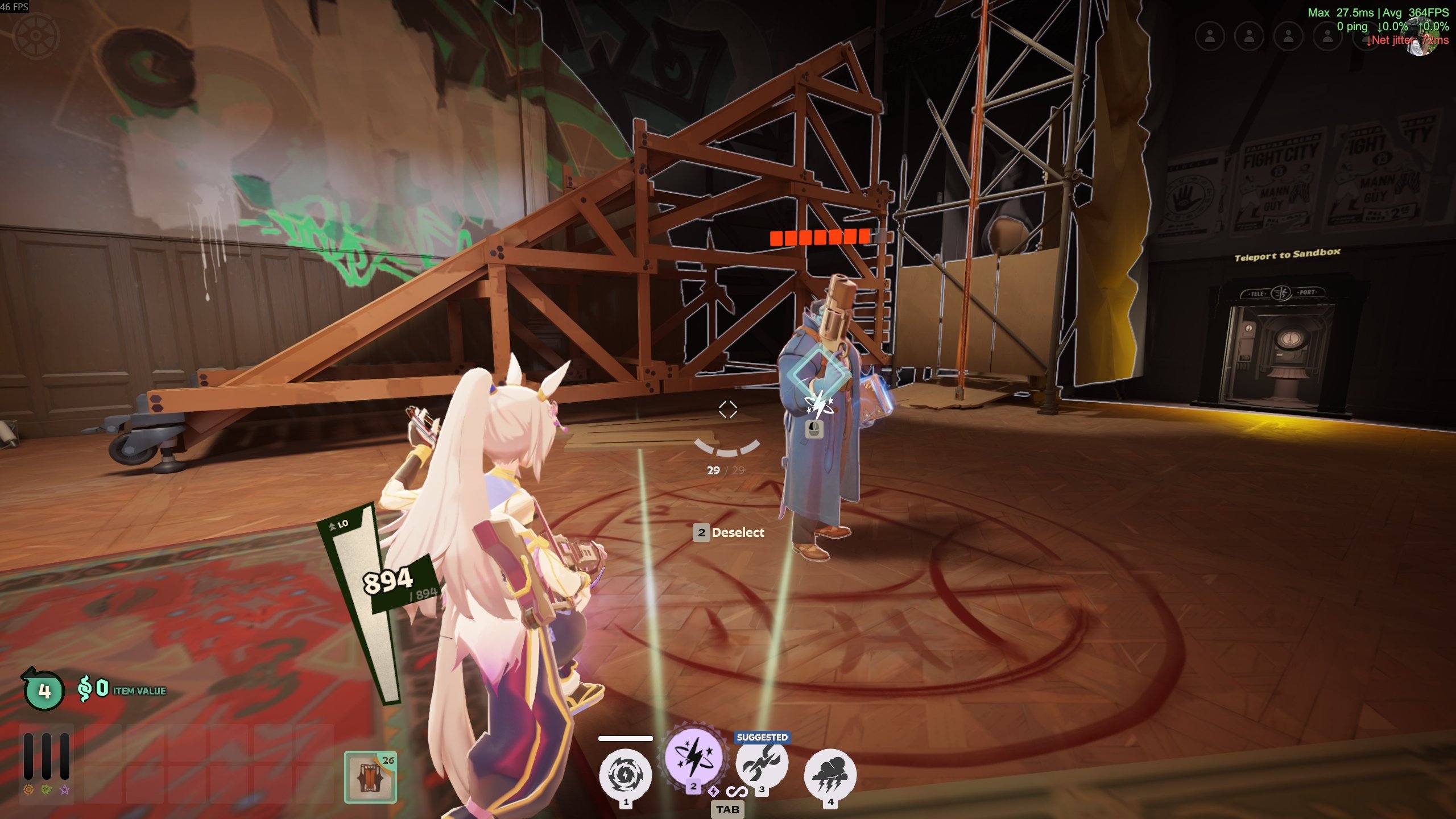
That is the indicator, drawn on Abrams while Static Charge is held: a diamond outline, the ability icon inside it, and a mouse icon for the left button. Each of those is a panel with a class on it.
Returns
| Value | Meaning |
|---|---|
| a number | Panels carrying the class right now. 0 means the class is tracked and nothing has it |
nil | Could not read. Not the same as 0 |
Treat 0 and nil differently. If you count nil as "no target", you cannot tell a failed read from aiming at nothing.
Returns nil when
- The internal is not running.
needs_internal = trueis missing fromscript_info. One line goes totsuki.log, once per script.- It is the first call or two for a new class. The first call registers the name, and the count arrives on a later frame. Poll it every tick instead of reading it once.
- The game has not used the class yet this session. It stays
niluntil the game first uses it. A misspelled class always readsnil. - 16 classes are already being tracked. That limit is shared by every loaded script.
- The interface could not be read this session.
Limits
- 16 classes at a time across all scripts. Two scripts watching ten classes each go over that limit, so some of their classes are not tracked.
- A class nobody has asked about for 10 seconds is dropped. Asking again re-registers it, with another frame or two of
nil. Calling it every tick keeps it alive. - Do not cache the result across frames. It changes with the interface.
- Do not use it for player data. Read health, souls, names and positions from the Player object, which has the exact values.
Class names
When a unit target ability has a valid target under the crosshair, these six classes appear and vanish together:
| Class | Notes |
|---|---|
unit_target_instance | The one to check. The game's unit target element |
target_shape | |
diamond | |
diamond_inner | |
button_hint | |
stack_count |
When a cast is not valid:
| Class | Notes |
|---|---|
cast_failed | |
invalid_cast_line |
Example
Casts Static Charge only while the game is showing the target indicator:
script_info = {
    name           = "Seven Autocast",
    description    = "Casts Static Charge on whoever you are looking at.",
    needs_internal = true,
}
id = hero_id.seven

local INDICATOR = "unit_target_instance"
local warned = false

function on_tick()
    local me = local_player()
    if not me or not me:is_alive() then return end
    if is_in_menu() then return end

    -- the indicator shows for any unit target ability, so check we are holding ours
    local sel = me:get_selected_ability()
    if not sel or sel.slot ~= slot.ability2 then return end
    if not me:is_ability_ready(slot.ability2) then return end

    local shown = hud.class_count(INDICATOR)
    if shown == nil then
        if not warned then
            warned = true
            print("hud.class_count returned nil, not casting")
        end
        return
    end
    warned = false

    if shown < 1 then return end
    input.press_key(0x01)
end